Discord welcome bot
A welcome bot greets each new member the moment they join. Gildi does it free: a message in a channel, a DM or both, an image card with their avatar and member number, starter roles, and a goodbye when they leave.

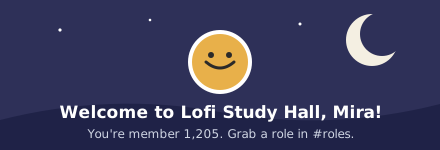
The default welcome with its image card. The text, the card’s background and its title are yours to change.
How it works
- Pick where it goes
A channel, the new member’s DMs, or both. In both, the DM can say something of its own.
- Write the message
Start from Gildi’s or write your own with {user}, {guild.name} and the member count. Add more versions and one is picked at random.
- Turn on the card
An image with their avatar, their name and “You are our 1,205th member” goes with the message.
- Add roles and a goodbye
Give starter roles on join, after a wait or once they pass Discord’s membership screening, and post a goodbye when they leave.
What you get
Welcome image cards
Their avatar and name on a background you pick, with a title you write. Plus lets you upload your own background.
A little variety
Add up to nine extra versions of the message. Each new member gets one at random, so the channel doesn’t read the same all day.
Auto-roles
Hand out roles on join, after a wait of up to 60 minutes on Free, or once a member passes screening. Bots get their own roles.
Goodbye and ban messages
Post when someone leaves, with a different message when they were banned instead.
New account alerts
Tell staff when an account younger than the days you set joins. The alert names them without pinging anyone.
Boost thanks
Thank members in a channel of your choice the moment they boost the server.
What each plan allows
Welcome messages, DMs, auto-roles and goodbyes work the same on every plan. The plan only changes what the image card can look like.
| Limit | Free | Plus | Pro |
|---|---|---|---|
| Welcome image cards | Built-in | Your backgrounds | Your backgrounds and layouts |
Plans are per server, and every module is on the free plan. See what Plus and Pro add.
You can run both for a while
Copy your welcome text across, swap in Gildi’s variables like {user} and {guild.name}, then switch off the old bot’s welcome so nobody is greeted twice.
Questions
Is the Discord welcome bot free?
Yes. Welcome messages, DMs, the image card, auto-roles and goodbyes all run on the free plan, with no trial and no card. Plus adds your own card backgrounds.
Can Gildi welcome new members by DM?
Yes. Send the welcome in a channel, by DM, or both. With both, the DM can have its own text.
What is a welcome card?
An image Gildi sends with the welcome: the member’s avatar, their name and their member number on a background. It’s on by default and works on every plan.
Can I give new members a role automatically?
Yes. Pick roles to give on join, after a wait, or once they pass Discord’s membership screening. Bots can get a role of their own instead.
Does it welcome bots too?
Not by default. Bots skip the welcome and the goodbye unless you turn that on, and only get the bot roles you pick.
Can I say goodbye when someone leaves?
Yes. Turn on goodbyes and pick a channel. Someone who was banned can get a different message from someone who left.
Other things Gildi does
Greet your next member properly
Add Gildi, pick a channel and your welcome is live in a couple of minutes. Free, with no trial and no card.